In every organization, ERP users have different roles, responsibilities, and access requirements. While some users need complete access to modules such as Sales, Purchase, Accounts, Production, Stores, Quality, and Reports, many operational users only need access to a specific screen to complete their daily tasks.
For example, a production operator may only need to update production quantities, a quality inspector may need to enter inspection details, and a gate security person may only need to record visitor or material movements. Providing full ERP access to these users is unnecessary and may create security risks.
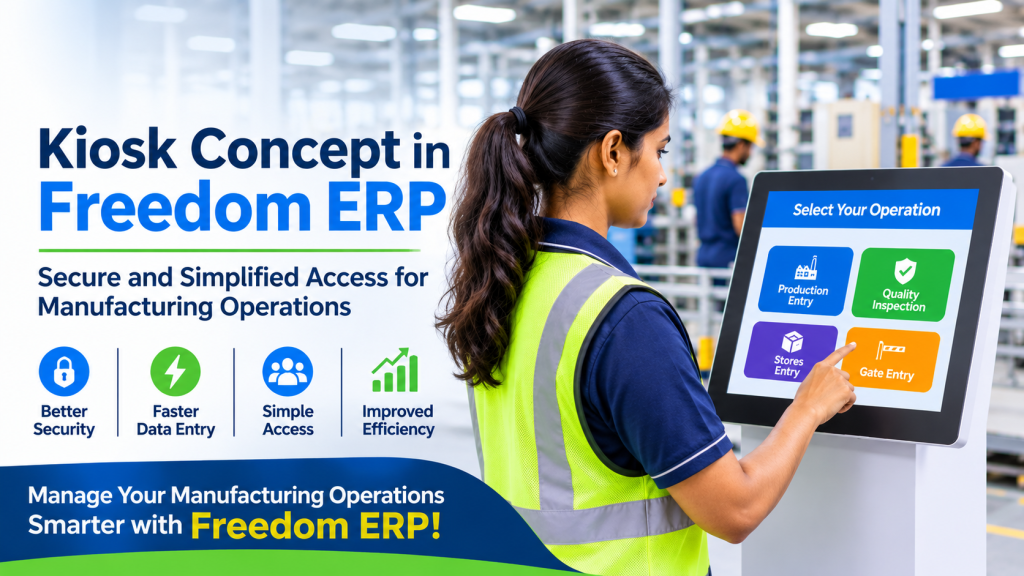
To address this requirement, Freedom ERP offers the Kiosk concept, providing restricted and role-based access to users based on their specific operational responsibilities.
What Is a Kiosk User in Freedom ERP?
A Kiosk User in Freedom ERP, is a restricted user account designed to perform limited and specific operations within the ERP system.
Instead of accessing the complete ERP dashboard, a kiosk user is directly redirected to an assigned screen after login. This allows employees to perform their daily activities quickly without navigating through multiple modules.
Kiosk User = Limited ERP access for quick, simple, and controlled data entry.
Users can perform only their assigned activities, while other modules, reports, master data, and administrative settings remain restricted.
This approach makes Freedom ERP a more secure and user-friendly Manufacturing ERP solution for organizations with different operational roles.
Why Is the Kiosk Concept Required in Manufacturing ERP?
In manufacturing industries, several ERP-related activities take place directly on the shop floor, in warehouses, at inspection stations, and at factory entry points.
Employees working in these areas generally do not require access to the complete ERP system. They need a simple interface that allows them to enter or update specific information without unnecessary navigation.
Common kiosk requirements include:
- Production quantity entry
- Quality inspection updates
- Employee attendance punching
- Stores material issue and receipt
- Gate entry management
- Visitor entry recording
- Employee self-service activities
- Barcode and QR code-based data entry
By providing restricted access, the kiosk concept reduces confusion, improves operational efficiency, and protects sensitive business information.
How Does the Kiosk Concept Work in Freedom ERP?
The kiosk concept in Freedom ERP, follows a simple login and access control process.
Step 1: User Login
The employee logs in using their assigned credentials.
Step 2: User Type Verification
The system checks whether the logged-in account is a normal ERP user or a kiosk user.
Step 3: Screen Redirection
- Normal users are redirected to the regular ERP dashboard.
- Kiosk users are directly redirected to their assigned operational screen.
Step 4: Restricted Access
The kiosk user can access only the permitted screen. All other menus and screens remain restricted.
This process ensures that every employee can access only the information and functionality required for their job.
Key Features of the Kiosk Concept in Freedom ERP
The Kiosk concept focuses on simplicity, security, and operational efficiency.
1. Restricted Screen Access
Users can access only their assigned screens, preventing unnecessary access to other ERP modules.
2. Direct Screen Redirection
After login, kiosk users are automatically redirected to their designated screen without navigating through the complete ERP dashboard.
3. Simple User Interface
The interface can be designed with minimal fields, clear instructions, simple messages, and easy-to-use buttons.
4. Barcode and QR Code Support
Barcode and QR code-based entry can simplify identification and data collection in manufacturing and warehouse operations.
5. Auto Logout
Automatic logout helps prevent unauthorized access when a user leaves the terminal unattended.
6. Terminal Mapping
Kiosk access can be controlled based on designated terminals or workstations, depending on organizational requirements.
7. Server-Level Validation
Access restrictions can be validated at the server level to prevent unauthorized users from opening other screens through direct URLs.
Together, these features help organizations maintain better control over ERP access while simplifying everyday operations.
Benefits of the Kiosk Concept in Manufacturing ERP
Implementing kiosk-based access in a Manufacturing ERP system offers several advantages.
Better Data Security
Restricted access protects confidential business information and prevents unauthorized users from accessing sensitive ERP modules.
Faster Data Entry
Employees can directly access the required screen and complete their tasks without navigating through multiple menus.
Reduced Training Effort
A simple and focused interface makes it easier for shop-floor employees and operational users to understand and use the ERP system.
Improved Data Accuracy
Direct data entry at the point of activity helps reduce manual communication errors and delays.
Real-Time Shop-Floor Updates
Production, quality, and stores information can be updated directly from the working location.
Better Operational Efficiency
Employees can focus on their assigned activities without unnecessary access or complicated navigation.
How Freedom ERP Simplifies Manufacturing Operations
Freedom ERP is an integrated Manufacturing ERP solution designed to manage business operations through a unified platform.
With features such as role-based access, production management, quality management, stores management, purchase, sales, and accounts, organizations can streamline their operations and improve visibility across departments.
The Kiosk concept further supports this approach by allowing operational employees to perform their daily tasks through controlled and simplified access.
Whether it is a production operator updating quantities, a quality inspector recording inspection results, or a security person managing gate entries, the right user gets access to the right screen.
Conclusion
The Kiosk concept in Freedom ERP provides a simple, secure, and controlled way for employees to perform their assigned operational tasks.
Instead of providing complete ERP access to every employee, organizations can use restricted kiosk accounts based on individual work requirements.
This improves data security, reduces errors, speeds up data entry, and makes everyday ERP usage easier for operational teams.
For manufacturing organizations looking to improve shop-floor efficiency and maintain better access control, the Kiosk concept is a valuable capability in a modern Manufacturing ERP solution.
Manage your manufacturing operations smarter with Freedom ERP!