Inventory plays a critical role in manufacturing operations. From raw materials and components to work-in-progress items and finished goods, manufacturers need accurate stock information to keep production running smoothly. However, many businesses still rely on spreadsheets, paper registers, and manual inventory records to manage their stock.
While manual inventory tracking may work for small operations, it becomes increasingly difficult as production volumes grow, product varieties increase, and supply chains become more complex.
This is where ERP for manufacturing can make a significant difference. By connecting inventory management with purchasing, production planning, stores, sales, and dispatch, manufacturing ERP software helps businesses improve stock visibility and streamline daily operations.
In this blog, we explore the differences between manual inventory tracking and inventory management systems, the challenges manufacturers face, and how an integrated manufacturing ERP solution can support better inventory control.
What Is Manual Inventory Tracking in Manufacturing?
Manual inventory tracking is the process of recording stock movements using spreadsheets, paper registers, or manually maintained databases.
In a manufacturing environment, inventory teams use these records to track raw materials, components, spare parts, work-in-progress items, and finished products.
For example, when a manufacturer receives raw materials from a supplier, an employee records the received quantity in a spreadsheet. When production consumes those materials, the stock records must be updated manually. Once finished goods are produced, their quantities must also be recorded.
Although this approach requires minimal initial investment, it depends heavily on timely data entry and coordination between departments.
Manual inventory tracking may be suitable for manufacturers with limited stock items and simple production processes. However, when multiple departments handle inventory transactions, maintaining accurate and updated records can become challenging.
What Is an Inventory Management System?
An inventory management system is a software solution that helps businesses record, monitor, and control inventory throughout its lifecycle.
For manufacturers, inventory management involves more than knowing how many items are available. It also requires visibility into material requirements, supplier receipts, production consumption, stock transfers, rejected materials, and finished goods.
An integrated ERP for manufacturing connects inventory information with other business functions, allowing departments to work with consistent data instead of maintaining separate records.
Depending on the ERP solution and its configuration, manufacturers can manage:
- Raw material and component inventory
- Purchase orders and material receipts
- Material issues to production
- Work-in-progress and finished goods
- Stock transfers between stores and locations
- Supplier and purchase information
- Stock adjustments and material returns
- Inventory reports and dashboards
- Reorder levels and material requirements
- Traceability of inventory movements
By integrating these processes, manufacturing ERP software can help businesses reduce repetitive work, improve coordination, and make more informed operational decisions.
ERP for Manufacturing vs. Manual Inventory Tracking: Key Differences
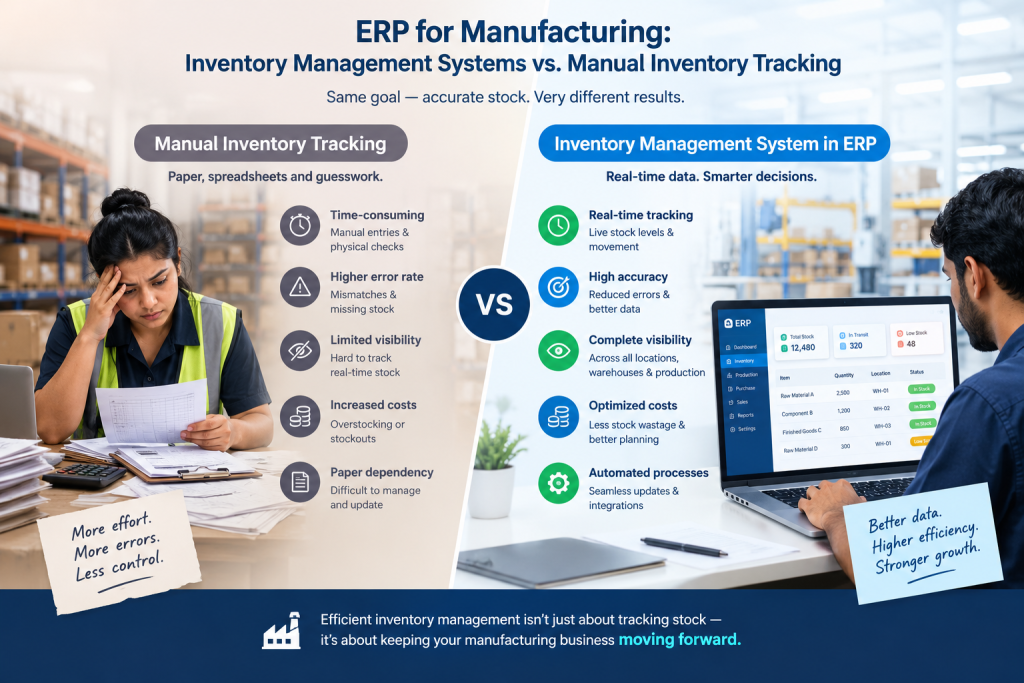
The main difference lies in how inventory information is recorded, updated, shared, and used across manufacturing operations.
| Comparison Factor | Manual Inventory Tracking | ERP for Manufacturing |
|---|---|---|
| Stock updates | Depend on manual entries | Can be updated through integrated transactions |
| Inventory visibility | Often delayed | Centralized, with timely updates |
| Material planning | Manual calculations | Can use production and material requirements data |
| Stock accuracy | Vulnerable to data-entry errors | More consistent when transactions are recorded correctly |
| Production coordination | Separate records and communication | Inventory can connect with production workflows |
| Purchase planning | Based on manual stock reviews | Can use stock levels and material requirements |
| Reporting | Time-consuming spreadsheet preparation | System-generated reports and dashboards |
| Stock traceability | Requires manual record checks | Inventory movements can be recorded systematically |
| Multi-store management | Difficult to coordinate | Centralized visibility, depending on configuration |
| Business scalability | Increasing manual effort | Supports more integrated processes as operations grow |
The actual benefits depend on the ERP features, integrations, and discipline with which employees record transactions.
1. Improve Raw Material Inventory Control
Raw materials are essential to uninterrupted manufacturing. If required materials are unavailable, production schedules may be delayed. On the other hand, purchasing excessive quantities can increase storage costs and tie up working capital.
With manual tracking, purchase and stores teams may have to compare spreadsheets, purchase records, and production requirements to determine material availability.
An integrated ERP for manufacturing helps bring relevant inventory and purchasing information together. Teams can review available quantities, incoming materials, material consumption, and stock requirements within connected workflows.
This supports better purchasing decisions and helps manufacturers maintain a more organized inventory process.
2. Connect Inventory Management With Production Planning
Inventory and production planning are closely connected. Manufacturing teams need to know whether the required materials are available before production begins.
When inventory records are maintained separately, production planners may work with outdated stock information. This can lead to material shortages, schedule changes, and avoidable delays.
Manufacturing ERP software can connect production planning with inventory and material requirements. Depending on the system configuration, planners can review stock availability and identify potential material shortages before scheduling production.
For example, if an upcoming production order requires 500 components but only 350 are available, the system can help teams identify the gap and plan procurement or replenishment accordingly.
This improves coordination between planning, purchasing, stores, and production departments.
3. Reduce Inventory Errors and Duplicate Data Entry
Manual inventory processes often involve multiple spreadsheets and repeated data entry. When the same transaction is recorded in different places, discrepancies can arise.
Common inventory challenges include:
- Incorrect stock quantities
- Missed material issues
- Duplicate transaction entries
- Delayed receipt updates
- Unrecorded stock transfers
- Differences between physical and recorded inventory
An ERP system helps standardize inventory transactions and maintain centralized records. When receipts, issues, transfers, and adjustments are entered correctly, the relevant stock information can be updated through the configured workflows.
This reduces dependence on separate spreadsheets and makes it easier to investigate inventory discrepancies.
However, regular physical stock verification and proper transaction controls remain important for maintaining inventory accuracy.
4. Gain Better Visibility Into Work-in-Progress and Finished Goods
Manufacturing inventory does not consist only of raw materials. Materials may pass through several production stages before becoming finished goods ready for dispatch.
Without connected records, it can be difficult to understand how much material is available, how much is being processed, and how many finished products are ready.
An ERP for manufacturing can connect inventory information with production and stores activities, helping businesses track material movements and finished goods as transactions are recorded.
This allows teams to gain a clearer understanding of inventory across different stages of manufacturing.
Better visibility can also help sales and dispatch teams coordinate customer commitments with the actual availability of finished products.
5. Strengthen Purchase Planning and Supplier Coordination
Purchasing the right materials at the right time is essential for manufacturing efficiency.
When purchasing decisions depend on manually updated stock reports, teams may place orders too late or purchase materials that are already available in sufficient quantities.
An integrated manufacturing ERP can support purchase planning by connecting inventory levels, purchase orders, material requirements, and supplier-related records.
Purchasing teams can use this information to review upcoming requirements, monitor incoming supplies, and coordinate with production planners.
This can help reduce unnecessary purchases, improve material availability, and support more structured procurement decisions.
6. Improve Stock Traceability Across Stores and Warehouses
Manufacturers often store raw materials, components, tools, spare parts, and finished products in different locations. Managing these movements through separate records can make it difficult to identify where inventory is available.
An ERP-based inventory process can record stock receipts, issues, transfers, and adjustments in a centralized system.
Where supported, additional features such as batch tracking, serial number tracking, and barcode integration can improve traceability further.
For manufacturers handling multiple product lines or storage locations, this helps teams understand stock movement and locate materials more efficiently.
7. Generate Faster Inventory Reports for Better Decisions
Inventory reports help management understand stock availability, consumption patterns, purchasing requirements, and slow-moving materials.
Preparing these reports manually can take considerable time, particularly when data comes from different departments.
With manufacturing ERP software, teams can access system-generated reports and dashboards based on recorded transactions and available reporting features.
Managers can use inventory information to review:
- Current stock availability
- Material consumption
- Stock movement history
- Pending purchase receipts
- Slow-moving or excess inventory
- Production material requirements
- Finished goods availability
Having relevant information in one system helps management make decisions with less dependence on manually consolidated spreadsheets.
Why Manufacturing Businesses Need More Than Standalone Inventory Software
A standalone inventory management system may be sufficient when a business only needs basic stock tracking. However, manufacturers often require inventory to work alongside several other business processes.
For example, a production delay may be related to a material shortage, a pending purchase order, a quality rejection, or a change in the production schedule.
If these activities are managed in separate systems, employees may need to communicate manually and reconcile multiple records to understand the situation.
An integrated ERP for manufacturing connects relevant business functions on a common platform.
Depending on the solution, this can include:
- Purchase: Manage purchasing activities and supplier transactions.
- Stores: Record receipts, issues, transfers, and stock availability.
- Planning: Coordinate production requirements and material availability.
- Production: Track manufacturing activities and material consumption.
- Quality: Record inspections, rejections, and quality-related inventory movements.
- Sales: Connect customer orders with product and stock information.
- Accounts: Support financial visibility through integrated business transactions.
- Dispatch: Coordinate finished goods availability with delivery activities.
This integrated approach helps manufacturers improve coordination between departments instead of treating inventory as an isolated function.
When Should Manufacturers Move From Manual Tracking to ERP?
There is no single inventory volume that determines when a manufacturer should adopt ERP software. The decision depends on operational complexity, transaction volume, business goals, and the limitations of current processes.
Consider evaluating an ERP for manufacturing when:
1. Stock discrepancies occur frequently
Repeated differences between recorded and physical stock can indicate weaknesses in inventory processes.
2. Production is delayed due to material shortages
If planners cannot reliably confirm material availability, inventory and production data may need better integration.
3. Employees spend too much time maintaining spreadsheets
Repeated data entry and manual reporting can take time away from higher-value operational activities.
4. Purchasing decisions are difficult to coordinate
When purchasing teams lack visibility into stock and upcoming production requirements, material planning becomes more challenging.
5. Inventory is spread across multiple stores or locations
Separate records make it harder to maintain a consistent view of stock availability.
6. Management needs timely operational reports
If reports take hours or days to prepare, centralized ERP reporting may help improve visibility.
7. The manufacturing business is expanding
More products, suppliers, production orders, and transactions can make manual processes increasingly difficult to manage.
How to Choose the Right ERP for Manufacturing
Selecting an ERP system requires more than comparing the number of features offered by different vendors. Manufacturers should assess how well the software supports their actual business processes.
Consider these factors before making a decision:
Inventory and stores management: Check whether the system supports raw materials, components, finished goods, stock transfers, receipts, and material issues.
Production planning integration: Evaluate whether inventory information can support material requirements and production scheduling.
Purchasing integration: Look for connected purchase orders, supplier records, and material receipt processes.
Quality management: Consider how the system handles inspection records, rejected materials, and quality-related inventory movements.
Reporting and analytics: Ensure that the available reports provide useful insights into stock availability, consumption, and movement.
Scalability: Choose a solution that can accommodate your expected growth in products, transactions, and operational complexity.
Ease of use: Employees across stores, purchasing, planning, and production should be able to learn and use the system effectively.
Implementation and support: Evaluate implementation requirements, employee training, customization, integrations, and ongoing support.
The right ERP should address existing inventory challenges while supporting the broader operational requirements of your manufacturing business.
How Freedom ERP Supports Manufacturing Inventory Management
Freedom ERP is designed to support connected manufacturing operations by bringing key business functions together on a single platform.
Instead of relying entirely on separate spreadsheets and disconnected records, manufacturers can use integrated ERP workflows to coordinate inventory-related activities with purchasing, planning, production, quality, sales, and dispatch.
Freedom ERP includes modules covering Marketing, Sales, Planning, Production, Quality, Purchase, Stores, Accounts, Maintenance, QMS, Services, Projects, and Gate Entry.
This integrated approach can help manufacturers improve visibility across material movements and business transactions, reduce repetitive data handling, and strengthen coordination between departments.
By connecting inventory with production planning and purchasing processes, businesses can make better-informed decisions about material availability, procurement requirements, and production activities.
The objective is not simply to replace spreadsheets with software. It is to build a more connected manufacturing environment where departments can work with consistent information and better-defined processes.
Conclusion: Choose ERP for Manufacturing to Build Better Inventory Control
Manual inventory tracking may be a practical starting point for businesses with simple stock requirements. However, as manufacturing operations grow, maintaining separate spreadsheets and manual records can make inventory control more time-consuming and difficult to coordinate.
An integrated ERP for manufacturing provides a more structured way to connect inventory with purchasing, production planning, quality, sales, and dispatch. This helps businesses improve stock visibility, streamline routine activities, and make better-informed operational decisions.
For manufacturers looking to move beyond disconnected inventory records, Freedom ERP offers an integrated platform designed to support end-to-end manufacturing processes.
Ready to improve inventory visibility and streamline your manufacturing operations?
Explore Freedom ERP and discover how an integrated manufacturing ERP solution can help connect your inventory, purchasing, planning, and production workflows.
Call to Action: Contact Freedom ERP to discuss your manufacturing requirements and explore the right solution for your business.