Introduction
In modern manufacturing businesses, ERP systems play a critical role in managing day-to-day operations. From purchasing raw materials and maintaining inventory to planning production, managing finances, and processing sales orders, ERP connects multiple business functions through a centralized system. When these activities depend on accurate and timely information, even a minor system error can create significant operational challenges.
Manufacturing ERP software, helps businesses coordinate production activities, maintain stock accuracy, manage purchase orders, and improve communication between departments. However, like any business application, an ERP system may occasionally experience live production errors. These errors can affect transactions, delay manufacturing activities, create data inconsistencies, and interrupt normal business operations.
For example, an incorrect inventory balance may delay material issuance, while an invoice calculation error could affect billing and financial reporting. If these issues are not identified and resolved promptly, their impact may extend across several departments.
Understanding how to handle live production errors is therefore essential for ERP support teams, developers, system administrators, and manufacturing businesses. A structured troubleshooting process helps teams identify the root cause, minimize disruption, protect business data, and restore normal operations safely.
In this blog, we explore nine essential steps to handle live production errors in ERP systems, common issues businesses may encounter, and best practices for reliable ERP production support.
1. What Is a Live Production Error in ERP Software?
A live production error is a problem that occurs in the actual production environment while employees are using a business application to perform real transactions. Unlike errors discovered during development or testing, production errors can directly affect ongoing business operations.
In a manufacturing environment, ERP software manages interconnected processes such as production planning, inventory control, procurement, quality management, accounting, and order processing. An error in one module can affect information used by other departments.
Common examples of live production errors include:
- Purchase orders failing to save or process correctly.
- Inventory balances not matching physical stock.
- Production orders displaying incorrect quantities.
- Invoice calculations producing unexpected values.
- Duplicate transactions appearing in business records.
- Reports displaying inconsistent information.
- Users experiencing slow response times during critical activities.
For instance, imagine a manufacturing company that needs to issue raw materials for an urgent production order. If the ERP system displays an incorrect stock balance, the production team may be unable to complete the material issue transaction. This can delay production and affect delivery schedules.
Reliable manufacturing ERP software should therefore be supported by a clear process for reporting, investigating, resolving, and documenting production errors.
2. Why Is Handling Live Production Errors Important?
Live production errors require immediate attention because ERP systems connect multiple business processes. A problem that initially appears minor can create wider operational difficulties if the underlying cause is not addressed.
Prevents business interruptions
Manufacturing companies depend on continuous coordination between purchasing, stores, production, quality, and dispatch. If an ERP transaction fails, employees may be unable to proceed with their assigned activities.
Timely troubleshooting helps restore essential functions and reduces unnecessary operational delays.
Reduces financial risk
Incorrect prices, duplicate invoices, inaccurate stock values, and calculation errors can affect financial records. Identifying these issues early helps businesses reduce the risk of incorrect transactions and costly corrections.
Protects data integrity
ERP systems store information that supports operational and management decisions. Incorrect updates, incomplete transactions, or duplicate entries can affect the reliability of this information.
Proper error handling helps maintain consistent and accurate business records.
Improves employee confidence
Employees rely on ERP software to complete daily work. Frequent unresolved errors can reduce confidence in the system and encourage manual workarounds.
A responsive ERP support process gives users a clear way to report issues and receive updates.
Supports better decision-making
Managers use ERP reports to monitor inventory, production performance, costs, and order status. Resolving data discrepancies helps ensure that business decisions are based on more reliable information.
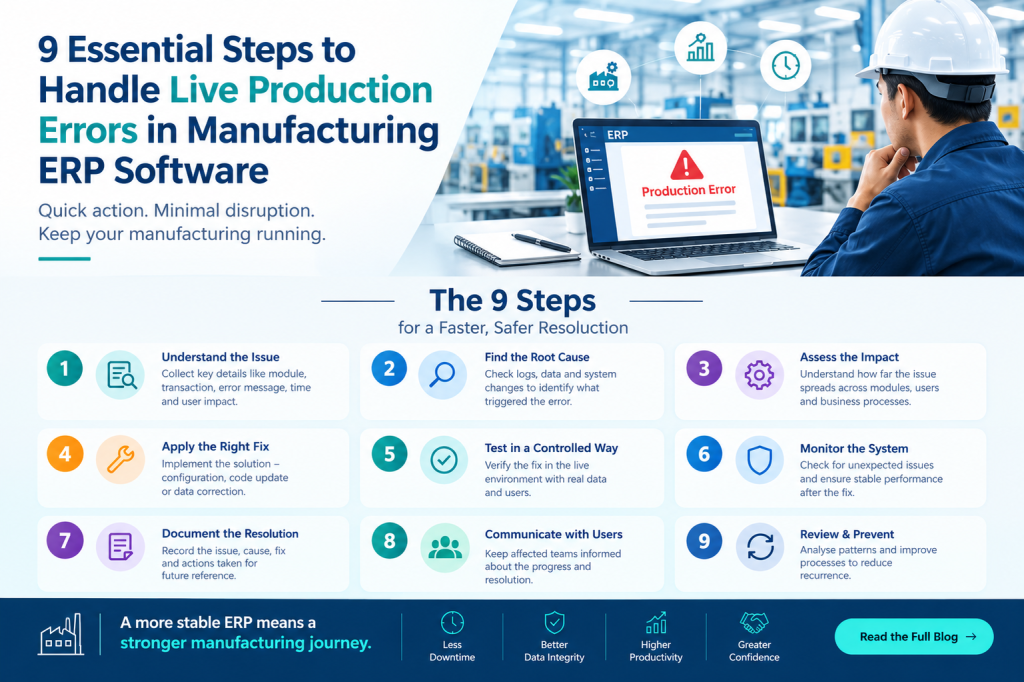
3. Nine Essential Steps to Handle Live Production Errors
A structured approach is more effective than making immediate changes without understanding the problem. The following nine steps can help ERP support teams investigate and resolve production issues systematically.
Step 1: Understand the Issue Clearly
The first step is to understand what the user experienced and what they expected the system to do.
Collect relevant details, including:
- The affected ERP module.
- The transaction type and reference number.
- The user’s description of the issue.
- The exact error message.
- The date and time the issue occurred.
- The actions performed before the error appeared.
- Whether the problem affects one user or multiple users.
For example, if a purchase order fails to save, determine whether the error occurs for every purchase order or only when a particular supplier, item, or configuration is selected.
Clear information reduces unnecessary investigation and helps the support team narrow down potential causes.
Step 2: Analyze the Business Impact and Set Priority
Not every production error requires the same level of urgency. The support team should evaluate how the issue affects business operations before assigning priority.
A useful assessment considers the number of affected users, the importance of the transaction, the availability of workarounds, and the potential financial or operational consequences.
For example, an error preventing an entire production team from issuing materials may require faster attention than a formatting issue in a non-critical report.
Establishing clear priorities helps teams allocate resources effectively and communicate realistic expectations to users.
Step 3: Reproduce the Issue in a Test or UAT Environment
Once the problem is understood, the next step is to determine whether it can be reproduced safely outside the live production environment.
A test or User Acceptance Testing (UAT) environment allows the support team to investigate the issue without unnecessarily affecting real business transactions.
Use representative test data and follow the same sequence of actions described by the user. Compare the expected result with the actual result.
For example, if an invoice displays an incorrect tax amount, test the relevant item, tax configuration, discount, and calculation sequence in a controlled environment.
Production data should not be copied into testing environments without appropriate authorization and safeguards. Where possible, use anonymized or representative data.
If the issue cannot be reproduced, compare user permissions, configuration, transaction history, and environmental differences to identify possible causes.
Step 4: Check Application Logs and Error Details
Application logs provide valuable information about what happened when an error occurred. Depending on the ERP architecture, useful information may also be available in database logs, integration logs, server monitoring tools, and application performance reports.
The support team should examine:
- Error messages and stack traces.
- Failed API requests and integration responses.
- Database exceptions.
- Application response times.
- Authentication and permission failures.
- Recent deployments or configuration changes.
- Scheduled jobs that failed to complete.
For example, a production order may fail because a required database field is missing, a service is unavailable, or a validation rule has rejected the transaction.
Logs should be reviewed securely. Sensitive customer information, passwords, access tokens, and confidential business data should not be exposed in support tickets or shared unnecessarily.
Step 5: Identify the Root Cause
After collecting evidence, determine why the error occurred rather than correcting only its visible symptoms.
Common root causes include incorrect master data, configuration problems, application defects, database constraints, permission issues, network interruptions, and integration failures.
Consider an inventory mismatch. The immediate symptom is that the ERP stock balance differs from the physical quantity. The actual cause might be an incomplete goods receipt, a duplicate stock movement, an unposted transaction, or an integration delay.
Review transaction history, related records, system behavior, and recent changes to establish the cause.
When necessary, involve the appropriate developer, database administrator, functional consultant, or infrastructure team.
A documented root cause makes it easier to select an appropriate solution and reduce the likelihood of the same issue recurring.
Step 6: Apply a Safe and Validated Fix
Once the root cause is confirmed, develop a solution that addresses the problem without creating new issues.
Depending on the situation, the solution may involve correcting configuration, fixing application logic, adjusting permissions, resolving an integration failure, or implementing a database correction through an approved procedure.
Before applying a fix, assess its potential impact on related ERP modules and business transactions.
For database-related changes, establish an appropriate recovery plan and obtain the required approvals. Avoid deleting or modifying live transaction records directly without understanding their dependencies and audit requirements.
Test the proposed correction using relevant scenarios, including normal transactions and important edge cases.
For example, a correction to an invoice calculation should be tested with different quantities, discounts, tax conditions, and rounding scenarios before deployment.
The objective is not simply to remove the error but to restore correct and dependable system behavior.
Step 7: Deploy the Fix Carefully in Production
After successful validation, deploy the approved fix according to the organization’s change-management process.
Before deployment, review the implementation plan, backup or recovery arrangements, dependencies, rollback procedure, and expected impact on users.
For significant changes, schedule deployment during an appropriate maintenance window where possible. Communicate any expected service interruption to affected departments.
Follow the organization’s approved release process rather than making untracked changes directly in the live environment.
After deployment, monitor application behavior and verify that the corrected functionality works as expected.
A controlled deployment reduces the possibility of introducing additional errors into manufacturing ERP software.
Step 8: Verify the Solution with Users
A technical fix is not complete until the affected business process has been checked.
Ask the reporting user to repeat the original transaction and confirm whether the expected result is achieved. Where appropriate, verify the related records, inventory balances, reports, or financial calculations.
For example, after resolving an inventory issue, confirm that the stock balance is correct and that the related material issue or production transaction can be completed.
Also check whether the correction has affected connected workflows.
If the problem continues, reopen the investigation rather than assuming that the issue is resolved.
Clear communication throughout this stage helps employees understand the outcome and return to their regular activities confidently.
Step 9: Document the Issue and Prevent Recurrence
Documentation turns individual troubleshooting experiences into reusable organizational knowledge.
Record the problem description, affected module, business impact, root cause, resolution, testing performed, deployment details, and final verification.
Where useful, add screenshots, relevant error messages, and links to internal support tickets. Exclude credentials and unnecessary confidential information.
The support team can use this information to create troubleshooting guides, update test cases, improve monitoring, and identify recurring problems.
For example, if several inventory discrepancies originate from the same integration failure, the team can investigate the integration process and introduce monitoring to detect future failures earlier.
Consistent documentation improves future response times and strengthens long-term ERP support.
4. Five Common Live Production Issues in Manufacturing ERP Software
Manufacturing ERP software supports interconnected activities, which means production errors can arise in several areas.
1. Inventory and Stock Mismatches
Stock discrepancies may occur when receipts, issues, returns, transfers, or adjustments are not processed correctly. They can affect material availability, production scheduling, and purchasing decisions.
Recommended response: Review the stock movement history, transaction status, unit of measure, and relevant inventory records before making an approved correction.
2. Slow Database Queries and Application Performance
Slow queries, inefficient database operations, resource limitations, and excessive concurrent activity can make ERP screens or reports respond slowly.
Recommended response: Examine performance metrics, execution plans where appropriate, resource utilization, and the affected operations. Validate performance improvements before releasing changes.
3. Invoice Generation Failures
Invoice generation may fail because of missing data, incorrect tax configurations, validation errors, permission restrictions, or integration problems.
Recommended response: Check the transaction details, validation messages, calculation rules, and related sales or accounting records. Verify the final invoice before confirming resolution.
4. Duplicate Transactions
Duplicate purchase orders, invoices, or inventory movements may result from repeated submissions, retry behavior, integration issues, or insufficient duplicate-prevention controls.
Recommended response: Determine whether the transactions were actually committed, inspect their references and statuses, and use approved correction procedures. Idempotency controls can help prevent repeated requests from creating duplicate records.
5. Validation and Integration Failures
ERP transactions may fail when mandatory fields are missing, business rules are not satisfied, or connected systems return errors.
Recommended response: Review validation messages, master data, permissions, API responses, and integration logs. Correct the underlying issue and retry the transaction safely.
5. Seven Best Practices for Reliable ERP Production Support
Handling individual incidents is important, but prevention helps manufacturing businesses reduce repeated disruptions.
- Maintain regular backups: Follow an established backup schedule and periodically test restoration procedures. A backup is useful only when the required data can be recovered.
- Monitor critical processes: Track important ERP services, failed jobs, database performance, integrations, and transaction errors to identify potential issues early.
- Test changes before deployment: Validate application updates, configuration changes, and database modifications in suitable non-production environments.
- Maintain clear issue records: Use a consistent ticketing process to track reported problems, priorities, ownership, progress, and resolutions.
- Control production access: Apply role-based permissions and approved change procedures to reduce unauthorized changes and accidental data modifications.
- Communicate with affected users: Provide timely updates about the issue, its business impact, expected next steps, and final resolution.
- Review recurring incidents: Analyze repeated failures to identify weaknesses in application design, training, configuration, monitoring, or business processes.
These practices help organizations improve the reliability of their ERP environment while supporting daily manufacturing operations.
6. How Manufacturing ERP Software Helps Reduce Operational Disruptions
A well-implemented manufacturing ERP system connects business functions and gives authorized users access to consistent operational information.
When supported by effective monitoring, testing, and support procedures, it can help businesses identify discrepancies earlier and reduce dependence on disconnected manual records.
For example, integrated inventory and production information can help teams investigate material availability issues. Connected purchasing and stores processes can make it easier to trace goods receipts and stock movements. Integrated sales and finance workflows can help users identify inconsistencies between orders, deliveries, and invoices.
However, ERP software alone cannot eliminate every production error. Reliable outcomes also depend on accurate master data, appropriate configurations, user training, infrastructure, security controls, and effective support practices.
Manufacturing companies should therefore evaluate ERP solutions not only by their features but also by how well they support process visibility, transaction traceability, reporting, and ongoing operational improvement.
Choosing suitable manufacturing ERP software can provide a stronger foundation for coordinated business operations and more informed decisions.
Conclusion
Live production errors are an important challenge for businesses that depend on ERP systems to manage daily operations. From inventory discrepancies and invoice failures to performance issues and duplicate transactions, even a small error can affect connected business processes.
A structured response helps reduce this risk. Understanding the issue, assessing business impact, reproducing the problem safely, checking logs, identifying the root cause, validating the fix, deploying it carefully, verifying the outcome, and documenting the resolution are essential steps for effective ERP production support.
Manufacturing businesses should also invest in preventive practices such as monitoring, regular backups, controlled deployments, access management, and continuous improvement.
With the right processes and reliable manufacturing ERP software, organizations can improve operational visibility, maintain more accurate business records, and respond to disruptions more effectively.
Looking to improve visibility and control across your manufacturing operations?
Freedom Software Solutions provides manufacturing-focused ERP solutions designed to help businesses coordinate their processes and manage essential operations through an integrated system.
Visit Freedom Software Solutions to learn more about its manufacturing ERP solutions and explore how an integrated approach can support your business.